Setting up a dedicated charging station for your devices can simplify your daily routine and keep your space tidy. With multiple gadgets needing power—smartphones, tablets, laptops, wireless earbuds, and more—it’s easy for cables and chargers to become a tangled mess. A well-designed charging station not only keeps your devices powered but also organized and easy to access.
In this guide, we’ll walk you through the steps to create a functional and neat charging station that meets your needs.
Why Set Up a Charging Station?
Before diving into the setup, it helps to understand the benefits of having a designated charging area:
– Organization: Keeps all your devices and cables in one place.
– Efficiency: Charges multiple devices simultaneously.
– Safety: Reduces the risk of cable damage and accidental trips.
– Aesthetics: Minimizes clutter for a cleaner look.
Choosing the Right Location
Start by selecting the best spot for your charging station. Consider the following:
– Accessibility: Choose a location where you usually use or store your devices, such as a desk, kitchen counter, or nightstand.
– Power source: Ensure there are enough electrical outlets nearby.
– Ventilation: Devices can heat up while charging, so avoid enclosed spaces.
– Space: Pick a surface large enough to hold all your devices and chargers comfortably.
Essential Components for Your Charging Station
Here’s what you’ll need to set up an efficient charging station:
– Power strip or USB charging hub: Look for one with multiple outlets or USB ports. USB-C ports are a bonus for newer devices.
– Charging cables: Use cables compatible with your devices. Consider shorter cables to reduce clutter.
– Device holders or stands: Keep devices upright and visible. These can be purchased or DIY.
– Cable organizers: Clips, sleeves, or boxes help manage cables neatly.
– Labeling tools: Small labels or color-coded tags make it easy to identify chargers and cables.
Step-by-Step Setup Guide
1. Gather Your Devices and Accessories
Make a list of all the devices you want to charge at once. Collect their chargers and cables. This helps you assess how many outlets and USB ports you will need.
2. Select a Power Solution
Depending on the number and type of devices, choose a power strip or a multi-port USB charging hub. For example:
– A power strip with several outlets plus a few USB ports.
– A dedicated USB charging station with multiple USB-C and USB-A ports.
Make sure the power source supports fast charging if your devices require it.
3. Prepare Your Surface
Clean the area where your charging station will be. If desired, use a non-slip mat to keep devices in place.
4. Arrange Device Holders
Place stands or holders to keep devices upright. This not only saves space but helps you see screen notifications while charging.
5. Connect and Organize Cables
Plug the power strip or hub into the wall outlet. Connect each charger or cable to the appropriate device holder. Use cable clips or sleeves to bundle and route cables neatly behind the desk or along the wall.
6. Label Your Cables and Ports
If multiple people use the charging station or you have many similar cables, labeling helps prevent confusion. Use small tags or stickers on cables and charging ports.
7. Test the Setup
Place each device on the charging station and ensure it powers up correctly. Adjust cable lengths and positioning as needed.
Tips for a Better Charging Station
– Use wireless chargers: Add wireless charging pads for Qi-compatible devices to reduce cables further.
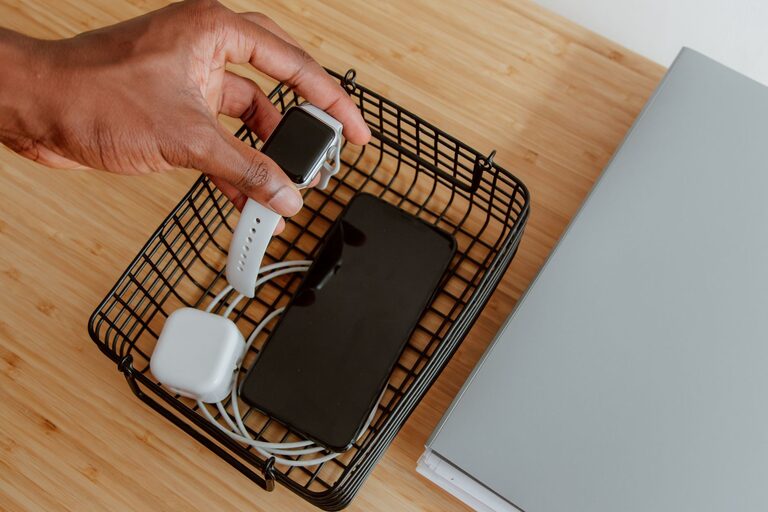
– Consider portability: Use a box or caddy if you want a charging station that can be moved between rooms.
– Keep spare cables: Store extra charging cables nearby for guests or replacements.
– Manage heat: Avoid stacking devices while charging to prevent overheating.
– Regular maintenance: Periodically check cables and chargers for damage and replace if necessary.
Creative Charging Station Ideas
– Drawer charging station: Convert a desk drawer into a hidden charging area with a power strip inside.
– Wall-mounted station: Install a shelf or board with built-in outlets and cable hooks.
– Decorative box: Use a stylish box with holes for cables to hide chargers discreetly.
Conclusion
Setting up a charging station is a practical way to keep your devices powered and organized. It saves time, reduces clutter, and protects your electronics. With a few simple tools and some creativity, you can customize a charging area that fits perfectly into your lifestyle and space.
Start by choosing the right location, gather your devices and accessories, and follow the steps above. Soon, you’ll enjoy a neat, efficient charging hub that keeps all your electronics ready to go.
About the Author